Safety isn’t a checklist. But a checklist can make safety real.
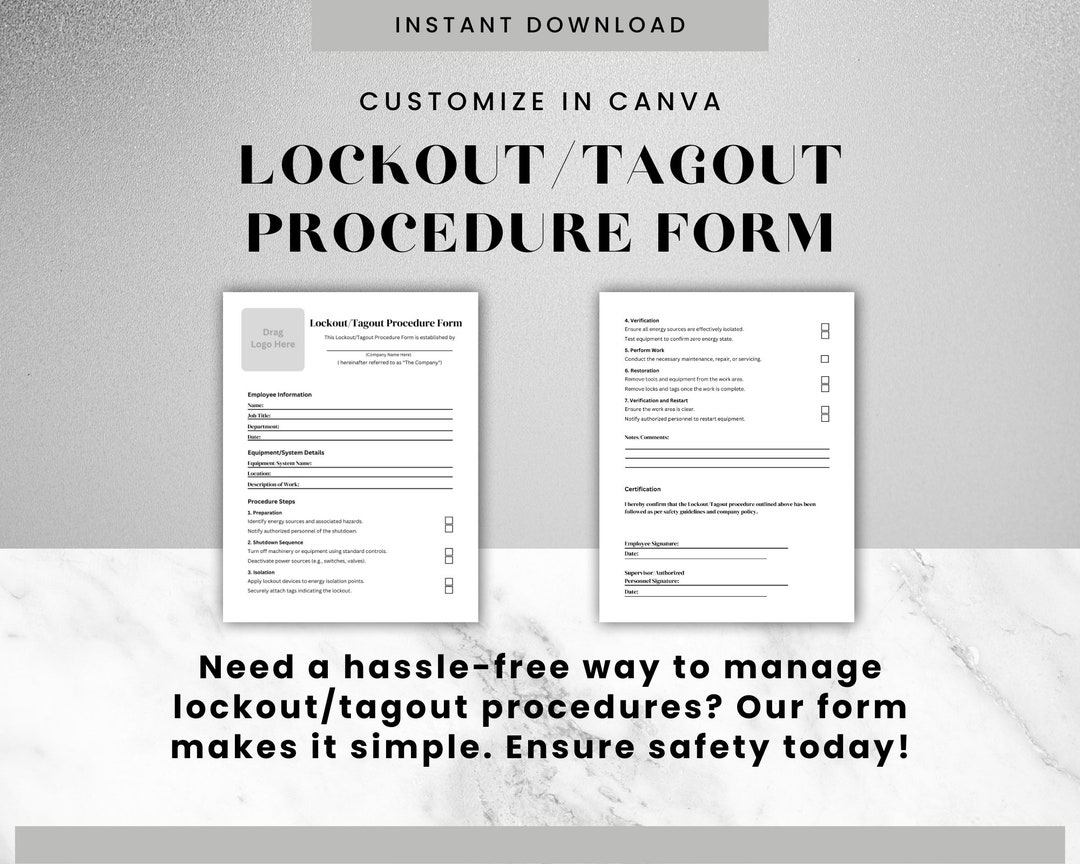
In high-risk industrial environments, one missed step during maintenance can lead to catastrophic injury or death. The lockout tagout (LOTO) process exists to prevent accidental energization of machinery. At the core of that process? The lockout tagout checklist form—a practical, enforceable tool that turns procedure into practice.
Yet too many organizations treat these forms as compliance paperwork, not life-saving workflows. That mindset leads to corner-cutting, inconsistent enforcement, and, ultimately, preventable accidents.
This article breaks down what a truly effective LOTO checklist form should contain, how to implement it correctly, and where most organizations fail—even when they think they’re compliant.
Why a Lockout Tagout Checklist Form Is Non-Negotiable
The mechanics of lockout tagout are straightforward: isolate energy sources, apply locks and tags, verify zero energy, and perform maintenance safely. In theory.
In practice, human error, time pressure, and unclear procedures derail this process daily.
The U.S. Bureau of Labor Statistics reports that nearly 10% of serious workplace accidents involve failure to control hazardous energy. OSHA estimates that compliance with LOTO standards prevents 120 fatalities and 50,000 injuries annually.
A well-designed checklist form isn’t just bureaucratic box-ticking—it’s a cognitive aid that ensures no step is skipped, especially under stress.
Think of it like a pilot’s pre-flight checklist. Even the most experienced pilot uses it. Not because they’ve forgotten how to fly, but because lives depend on consistency.
Without a standardized form, LOTO becomes inconsistent. One technician might double-check voltage with a meter; another might assume the machine is dead. One might lock the main disconnect; another might miss a secondary hydraulic line.
The checklist form eliminates guesswork.
Essential Elements of an Effective Lockout Tagout Checklist Form
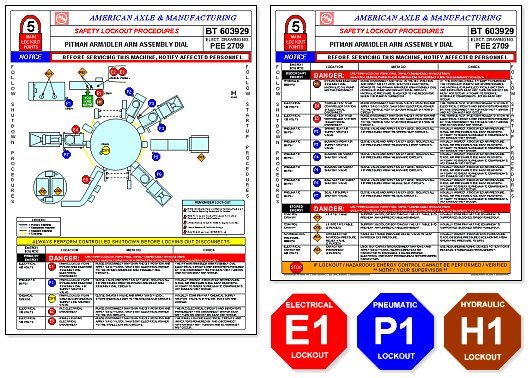
A generic LOTO template downloaded from a free website won’t cut it. Your form must reflect the real equipment, energy types, and team workflows in your facility.
Here are the seven non-negotiable components every LOTO checklist form should include:
1. Equipment Identification Clearly list:
- Machine name
- Location (e.g., Production Line B, Station 3)
- Asset ID or serial number
Why it matters: Multiple machines may look identical. Confusing them during shutdown can be deadly.
2. Authorized Personnel Details Fields for:
- Name of authorized employee performing LOTO
- Employee ID
- Date and start time of lockout
This creates accountability. If something goes wrong, you know who initiated the procedure.
3. Energy Source Inventory List every energy type connected to the machine:
- Electrical (voltage level)
- Pneumatic
- Hydraulic
- Chemical
- Thermal
- Gravitational (e.g., suspended loads)
Real-world example: A maintenance worker on a conveyor system forgot a spring-loaded arm held stored mechanical energy. The arm snapped shut during servicing, crushing his hand. The energy type wasn’t listed on the checklist. It should have been.
4. Lock and Tag Application Log A table-style section where the technician records: - Type of lock used (e.g., hasp, valve lock, circuit breaker lock) - Lock ID number - Tag contents (e.g., “Do Not Operate – Maintenance in Progress”) - Location of each lock
This section must be signed off per lock, not as a blanket approval.
5. Isolation and Verification Steps Checkboxes for:
- Shutting down equipment via normal controls
- Isolating all energy sources (e.g., flipping breaker, closing valve)
- Releasing or blocking residual energy (e.g., bleeding lines, grounding)
- Testing for zero energy using a voltage meter or other device
Critical tip: “Verify zero energy” isn’t a box to check after locking. It’s a separate step that must happen after isolation and before work begins.
6. Group LOTO Coordination (If Applicable) For team maintenance, include:
- Names of all affected employees
- Role of primary authorized employee
- Use of group lockout boxes
- Communication plan
A common mistake? One technician assumes everyone is locked out because they applied their lock. Without coordination, others may still be at risk.
7. Release and Restart Authorization Final sign-offs for:
- Completion of work
- Removal of tools and guards
- Notification to affected employees
- Unlocking sequence
- Final approval signature
Restarting a machine is just as dangerous as servicing it. This section ensures only trained personnel re-energize the system.
Common Mistakes That Render LOTO Forms Useless
Even with a checklist in hand, companies fail. Here’s where they go wrong:
Mistake 1: Using a One-Size-Fits-All Template A checklist for a 480V press brake shouldn’t be the same as one for a compressed air system. Generic forms skip equipment-specific risks.
Fix: Customize each checklist. Use equipment manuals and hazard assessments.
Mistake 2: No Training on the Form Itself Employees can’t follow a checklist they don’t understand. Yet many are handed a form without instruction.
Fix: Train workers on how to read and complete the form, not just the LOTO procedure.
Mistake 3: Allowing Digital Signatures Without Authentication If anyone can sign off digitally, the form loses integrity.
Fix: Use authenticated digital systems or require wet signatures for critical steps.
Mistake 4: Skipping the Zero-Energy Verification Checking “verified” without testing is the most dangerous shortcut.
Fix: Require proof—such as a meter reading or witnessed test—in the form.
Mistake 5: Not Reviewing and Updating Forms Machines change. So should your checklists.
Fix: Audit LOTO forms annually or after equipment modifications.
How to Implement a LOTO Checklist in Your Workflow
Having a form isn’t enough. It must be integrated into your safety culture.
Step 1: Build Checklists per Machine Work with maintenance leads and safety officers to create a unique form for each high-risk asset.
Step 2: Print and Laminate Keep physical copies near equipment. Digital access is helpful, but power may be off during lockout.
Step 3: Train and Certify Ensure all authorized employees can complete the form correctly under supervision.

Step 4: Conduct Audits Monthly, review completed forms. Look for missing signatures, unchecked items, or inconsistent lock IDs.
Step 5: Integrate with Permit Systems Link LOTO forms to work permits. No completed checklist = no work authorization.
Digital vs. Paper LOTO Checklist Forms: What Works Best?
The shift to digital is growing, but paper still has its place.
| Factor | Paper Forms | Digital Forms |
|---|---|---|
| Accessibility | Always available, no device needed | Requires tablet or phone |
| Audit Trail | Hard to track revisions | Timestamps, user logs, cloud storage |
| Real-Time Updates | Must reprint | Changes push instantly |
| Compliance Proof | Scanning required | Built-in reporting |
| Training Aid | Static | Can include videos, prompts |
Best practice: Use digital forms where connectivity and devices are reliable. Use paper as a backup—or as the primary in remote or high-interference areas.
5 Reliable Sources for Lockout Tagout Checklist Templates
Need a starting point? These resources offer customizable, OSHA-aligned templates:
- OSHA’s LOTO Standard (29 CFR 1910.147)
- The foundation. While it doesn’t provide a form, it outlines required procedures. Use it to validate your checklist.
- NIOSH LOTO Assistant App
- Free mobile tool that guides users through creating machine-specific checklists. Includes hazard identification and step-by-step prompts.
- ANSI/ASSE Z244.1-2016
- Industry standard with detailed guidance on lockout programs and documentation. Purchase through ANSI.org.
- SafetyNow LOTO Software
- Offers pre-built templates, digital form routing, and audit trails. Ideal for facilities with 50+ machines.
- EHS Daily Advisor (Safety.BLR.com)
- Free downloadable templates by equipment type—conveyors, presses, HVAC systems—with editable fields.
Don’t just download and deploy. Customize every template to your site’s needs.
Real-World Use Case: How a Brewery Avoided a Catastrophe
A regional craft brewery had a minor injury when a bottling line unexpectedly powered on during cleaning. Investigation revealed no formal LOTO process.
They implemented machine-specific checklist forms for: - Bottle fillers - Labelers - Conveyor systems - CO2 tanks
Each form listed energy sources (electrical, pneumatic, mechanical), required dual verification, and included a group lockout box.
Within six months, near-miss reports dropped by 70%. More importantly, maintenance teams reported feeling safer and more confident.
The change wasn’t just the form—it was the discipline the form enforced.
Design Your LOTO Checklist to Prevent Failure, Not Just Check Boxes
A lockout tagout checklist form should do more than satisfy an auditor. It should stop a tragedy before it starts.
That means going beyond compliance. It means designing forms that are: - Clear (no technical jargon) - Actionable (specific steps, not vague instructions) - Accountable (traceable to individuals) - Adaptable (updated as equipment changes)
The best form in the world won’t save lives if it’s ignored, outdated, or unclear.
But a well-built, well-trained, well-enforced checklist? That’s the difference between a routine maintenance job and a 911 call.
Start today: pull one LOTO form from your files. Review it against the seven elements listed above. If it’s missing any, revise it now.
Because safety isn’t a policy. It’s a process. And the checklist is its backbone.
FAQ
What should you look for in Lockout Tagout Checklist Form: Your Key to Safer Workplaces? Focus on relevance, practical value, and how well the solution matches real user intent.
Is Lockout Tagout Checklist Form: Your Key to Safer Workplaces suitable for beginners? That depends on the workflow, but a clear step-by-step approach usually makes it easier to start.
How do you compare options around Lockout Tagout Checklist Form: Your Key to Safer Workplaces? Compare features, trust signals, limitations, pricing, and ease of implementation.
What mistakes should you avoid? Avoid generic choices, weak validation, and decisions based only on marketing claims.
What is the next best step? Shortlist the most relevant options, validate them quickly, and refine from real-world results.